Breadcrumb navigation: showing readers where they are
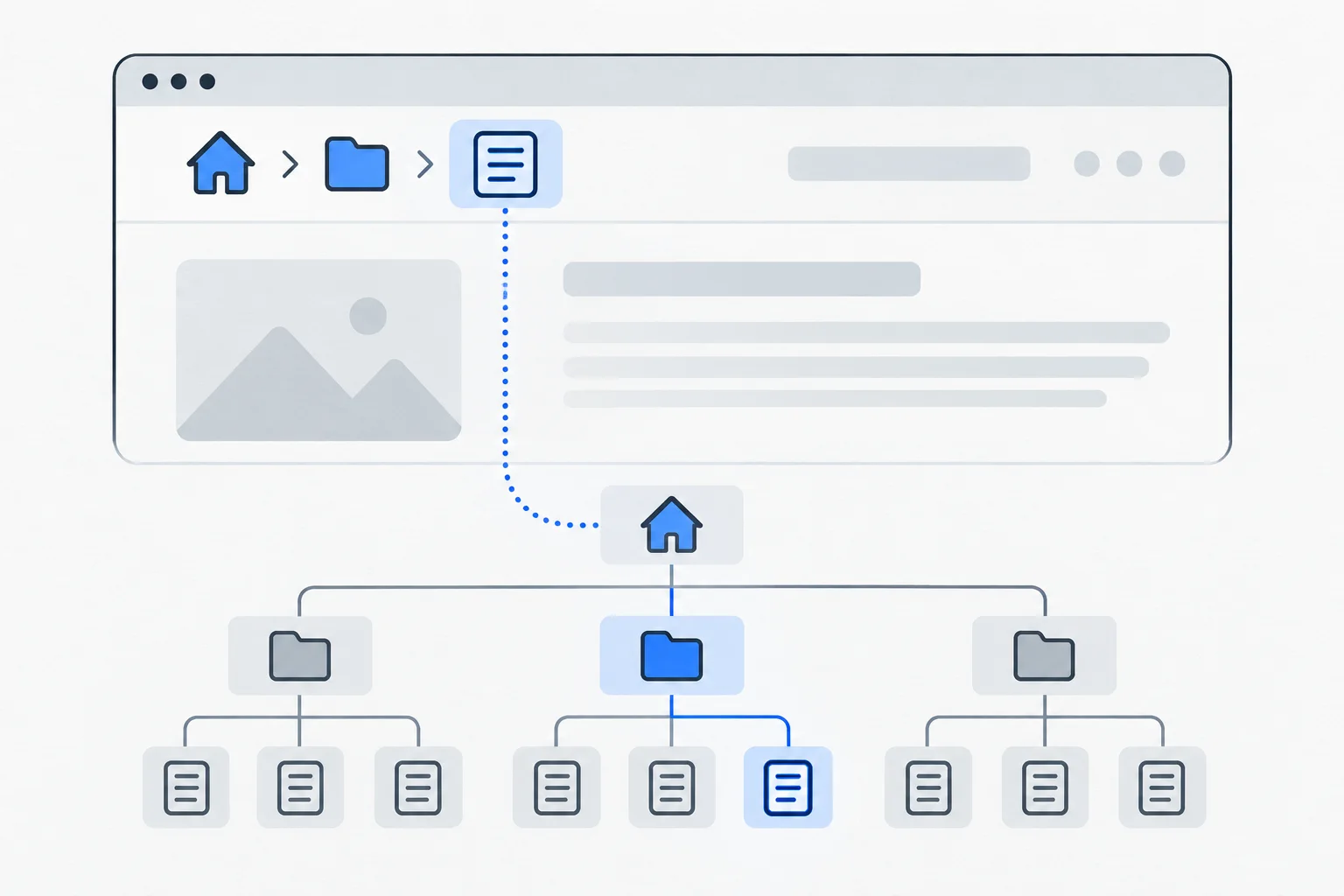
Breadcrumb navigation is a short trail showing a page’s position in a website hierarchy, such as Home › Knowledge base › Irrigation. It helps readers return to broader topics; it does not necessarily list their previous clicks.
Also known as: breadcrumb trail · breadcrumbs
At a glance
- Breadcrumbs describe content hierarchy rather than copying browsing history.
- Visible navigation and BreadcrumbList structured data are separate layers that should agree.
- Breadcrumbs do not replace primary navigation or contextual links.
On this page
Why is a short trail useful?
Many visitors arrive directly on an article or product page without seeing the homepage. Breadcrumbs place that page in a wider context.
“Home › Knowledge base › Garden care” can show that an irrigation guide belongs to a collection. This makes website architecture understandable from the individual page. The trail should aid orientation rather than merely decorate the screen.
Hierarchy or browsing history?
A hierarchical trail can remain identical whether visitors arrive from Google, email or the homepage. It does not claim they followed those steps.
The browser's Back button can return to their actual previous page; breadcrumbs lead toward the site's logical parent topic. These answer different navigation needs.
Google's BreadcrumbList documentation also describes position in the site hierarchy. 1 If a page belongs to multiple useful categories, decide consistently which paths to display and describe.
What should be clickable?
Parent levels generally link to real destinations. The current page can appear as plain text. Earlier levels must not be attractive labels for nonexistent categories.
Choose internal-link text and destinations carefully. “Knowledge base” should open a useful collection of further topics. Google's crawlable-link guidance applies here too. 2
Keep the trail readable and usable on mobile. Long labels may wrap, but replacing essential navigation with cryptic abbreviations sacrifices clarity.
Example: an office-furniture website
Imagine a guide to lumbar support with “Home › Knowledge base › Office chairs.” Readers can reach related explanations of seat height and materials.
There is no need to impose the full product-catalog hierarchy on the guide. Its informational purpose differs from a chair's sales page. Search intent helps identify an appropriate context.
Changing the article title need not change its parent levels. Breadcrumbs express the knowledge base's structure rather than an accidental list rewritten with every headline.
How does structured data fit in?
Alongside visible navigation, structured data using BreadcrumbList can describe the hierarchy in machine-readable form. Its meaning should agree with the real navigation. 1
Markup should describe the page's actual content and role. 3 Invented categories should not present a different structure to search engines.
Google's documentation describes breadcrumb search appearance for desktop results. That does not make a website's own mobile breadcrumbs useless: search presentation and on-site navigation are distinct surfaces.
What can breadcrumbs not fix?
They do not repair confused categories, broken destination pages or missing related content. A Garden care link opening an empty list merely exposes a structural problem.
Within SEO, breadcrumbs contribute to a coherent site. Their value comes from helping people navigate, rather than guaranteeing that one new row changes rankings.